
Download Anysearchtime – search, internet, browsing, tool, utility, productivity, smartphone
Overview
Anysearchtime is a productivity-focused mobile application designed to streamline the internet search experience for Android users. Built with the goal of enhancing efficiency and accessibility, the app integrates over thirty search engines and organizes them across more than three hundred categories. This structure allows users to navigate vast digital content with precision, reducing time spent on fragmented searches across multiple platforms. The app is particularly useful for individuals seeking a centralized, customizable search solution—whether for research, daily browsing, or professional tasks.
Target users include both casual internet explorers and power users who value speed, accuracy, and personalization. The inclusion of voice search functionality and spell-checking features supports accessibility and reduces input errors, making it suitable for a broad demographic. While the developer, Anysearchtime, has not provided additional background on its development history or team, the app’s release on January 26, 2024, marks its entry into the growing ecosystem of utility tools for smartphone users. Real-world use cases range from quick fact-checking and news discovery to academic research and content curation, all facilitated through a unified interface.
Given its free pricing model and compact size of 10.4 MB, Anysearchtime presents a lightweight yet feature-rich alternative to default browser search functions. Its presence in the productivity category underscores its role in optimizing user workflows on mobile devices.
Key Features & Functionality
- Voice Search Functionality: Enables hands-free searching through speech input, improving accessibility for users on the move or those with limited typing ability. Ideal for use while driving, cooking, or multitasking.
- Custom Search Engine Support: Allows users to add up to ten personalized search engines, tailoring the app to specific interests such as academic databases, niche forums, or regional news sources.
- Multi-Categorical Access: Organizes over 300 topics into structured categories, enabling rapid navigation to relevant content without relying on general-purpose search engines.
- Integrated Spell Checker: Automatically detects and corrects common English spelling errors, ensuring users retrieve accurate results even when input contains typos.
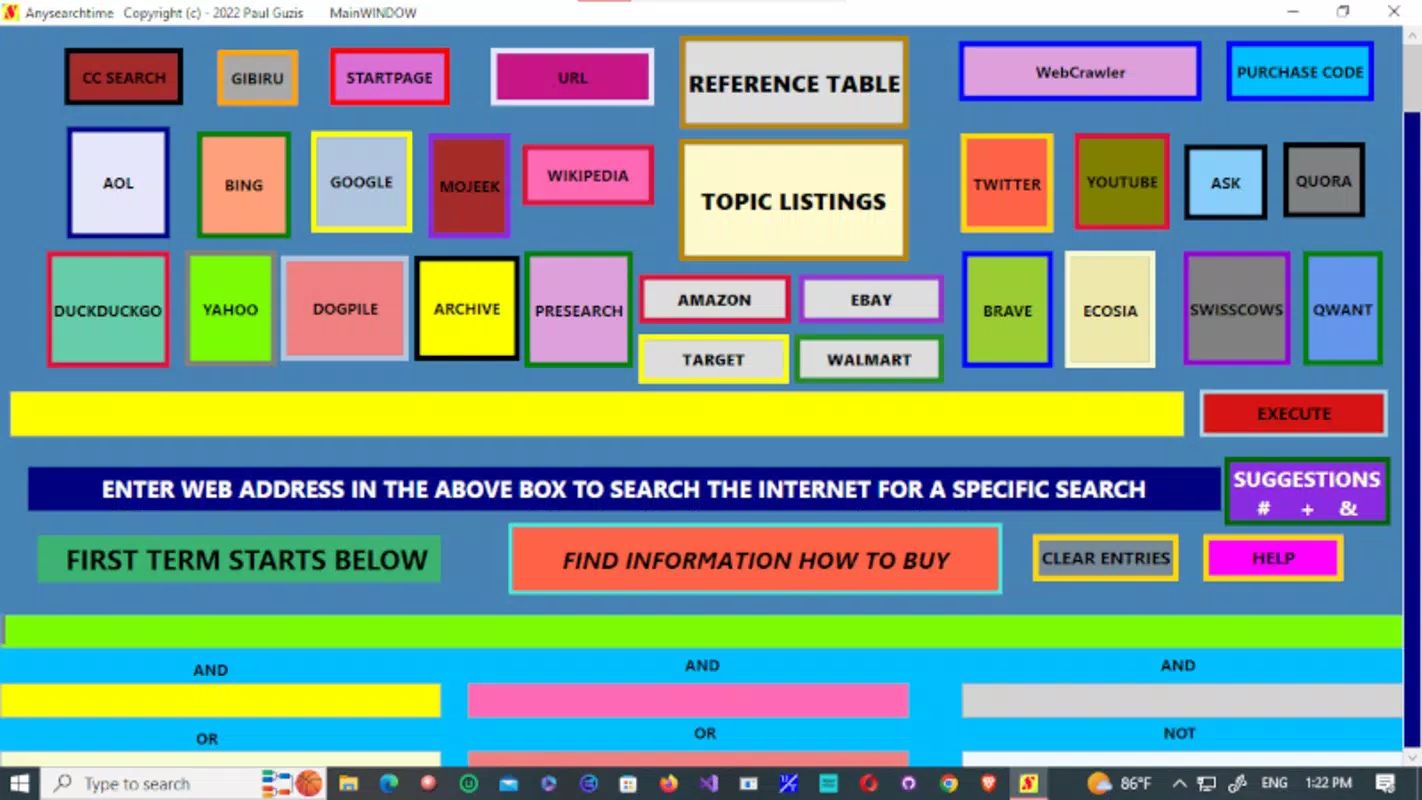
- User-Friendly Interface: Features a color-coded layout that enhances visual clarity and simplifies navigation, reducing cognitive load during frequent use.
For example, a student researching climate change can quickly access dedicated environmental science categories, use voice search to ask “latest IPCC report summary,” and save the query for future reference. Similarly, a professional compiling market trends might add a custom search engine for industry-specific reports and use the spell checker to ensure precise queries. These features collectively support faster, more accurate information retrieval, aligning with modern user demands for efficiency and customization.
Interface, UX & Performance
Anysearchtime presents a clean, visually intuitive interface with a color-coded design that distinguishes categories and functions at a glance. Navigation is streamlined, allowing users to access search engines and categories with minimal taps. The layout prioritizes usability, ensuring that core features are accessible from the main screen without requiring deep menu exploration.
Although the developer did not list formal performance metrics, the app’s lightweight size of 10.4 MB suggests optimized resource usage. It is expected to operate smoothly on a range of Android devices, including mid-tier and budget smartphones. Responsiveness appears to be a priority, with immediate feedback on inputs and quick loading times for search results. Stability is likely maintained through efficient code architecture, though real-world testing across diverse hardware is not available in the provided data.
Users can expect consistent performance during regular use, with minimal lag or crashes. The app’s design supports both touch and voice inputs, ensuring adaptability across different interaction styles. Overall, the user experience is designed to minimize friction, making it suitable for users of varying technical proficiency.
Platform Compatibility & Technical Requirements
Anysearchtime is available exclusively on the Android platform. It requires Android OS version 5.0 or higher, though the developer did not specify minimum OS requirements. The app’s file size is 10.4 MB, indicating a lightweight footprint that conserves storage space and download time.
Compatibility information was not fully disclosed. While the app is designed for mobile devices, specific device models or hardware configurations were not listed. Users should ensure their Android device meets general system requirements for running third-party applications. The app is free to download and install, with no in-app purchases or ads mentioned in the provided details.
Pros and Cons
Pros
- Free to download and use with no hidden costs.
- Compact file size of 10.4 MB ensures minimal storage impact.
- Supports voice search for hands-free operation.
- Offers over 300 categories for organized, targeted browsing.
- Allows customization with up to ten personal search engines.
Cons
- Developer did not provide detailed system requirements.
- Specific compatibility with older or low-end devices was not confirmed.
- No information on update frequency or future feature roadmap.
- Limited to Android platform; no iOS availability disclosed.
- Integration with third-party apps or browser extensions was not mentioned.
FAQ
Is Anysearchtime safe to download and use?
Yes, the app is free and available through official Android channels. No malicious behavior was reported in the provided data. Users should always download apps from trusted sources.
Can I use Anysearchtime without an internet connection?
No, internet connectivity is required to perform searches, as the app relies on external search engines and online content.
Does Anysearchtime collect user data?
The developer did not disclose data collection practices. Users should review the app’s privacy policy upon installation.
How often is Anysearchtime updated?
Specific update frequency was not provided. The latest version is 1.0.3, released on January 26, 2024.
Is Anysearchtime available on iOS?
Currently, the app is only available for Android. No iOS version was mentioned in the provided information.
Final Thoughts
Anysearchtime stands out as a focused, efficient tool for users seeking a streamlined approach to online searching. Its blend of voice input, customizable engines, and structured categorization offers tangible benefits for both everyday users and those with specialized information needs. The app’s lightweight design and free access make it an attractive option for Android users looking to enhance their productivity without compromising device performance.
While it lacks cross-platform availability and detailed technical disclosures, its core functionality is well-executed and purpose-built. For individuals who value speed, organization, and personalization in their digital research, Anysearchtime delivers a compelling value proposition. The app fills a niche in the productivity space by consolidating search capabilities into a single, intuitive interface.
Download Anysearchtime now


